
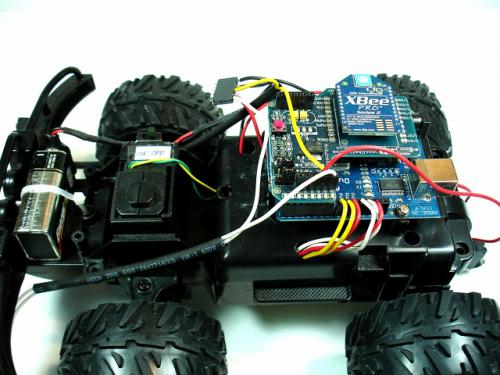
Используя Arduino и XBee-shield можно сделать робота, полностью управляемого с ПК по радиоканалу.
Код скетча:
#define BACKWARD 0x2
#define LEFT 0x4
#define RIGHT 0x8

// Sensor Data
#define LEFT_FRONT_BUMPER 0x1
#define RIGHT_FRONT_BUMPER 0x2
#define REAR_BUMPER 0x4
#define DEBOUNCE_THRESHOLD 50

int sensorData = 0;
int lastSensorData = 0;
int lastLeftFrontBumperReading;
int lastRightFrontBumperReading;
int lastRearBumperReading;
int leftFrontBumperReadingTime;
int rightFrontBumperReadingTime;
int rearBumperReadingTime;
int command[2];

void setup() {
  Serial.begin(9600);

  pinMode(DRIVE_ENABLE_PIN, OUTPUT);
  pinMode(TURN_ENABLE_PIN, OUTPUT);
  pinMode(LEFT_PIN, OUTPUT);
  pinMode(RIGHT_PIN, OUTPUT);
  pinMode(BACKWARD_PIN, OUTPUT);
  pinMode(FORWARD_PIN, OUTPUT);

  pinMode(LEFT_FRONT_BUMPER_PIN, INPUT);
  digitalWrite(LEFT_FRONT_BUMPER_PIN, HIGH);
  pinMode(RIGHT_FRONT_BUMPER_PIN, INPUT);
  digitalWrite(RIGHT_FRONT_BUMPER_PIN, HIGH);
  pinMode(REAR_BUMPER_PIN, INPUT);
  digitalWrite(REAR_BUMPER_PIN, HIGH);

}

void loop() {

  // Read sensors and transmit
  readSensors();
  if (sensorData != lastSensorData) {
    Serial.write(sensorData);
    lastSensorData = sensorData;
  }

  // listen for wireless commands
  if (Serial.available() > 0) {
    if (readCommand() > 0) {
      executeCommand();
    }
  }
}

void readSensors() {
  int s;

  s = digitalRead(LEFT_FRONT_BUMPER_PIN);
  if (s != lastLeftFrontBumperReading) {
    leftFrontBumperReadingTime = millis();
  }
  if ((millis() - leftFrontBumperReadingTime) > DEBOUNCE_THRESHOLD) {
    if (s == LOW) {
      sensorData |= LEFT_FRONT_BUMPER;
    } else {
      sensorData &= ~LEFT_FRONT_BUMPER;
    }
  }
  lastLeftFrontBumperReading = s;

  s = digitalRead(RIGHT_FRONT_BUMPER_PIN);
  if (s != lastRightFrontBumperReading) {
    rightFrontBumperReadingTime = millis();
  }
  if ((millis() - rightFrontBumperReadingTime) > DEBOUNCE_THRESHOLD) {
    if (s == LOW) {
      sensorData |= RIGHT_FRONT_BUMPER;
    } else {
      sensorData &= ~RIGHT_FRONT_BUMPER;
    }
  }
  lastRightFrontBumperReading = s;

  s = digitalRead(REAR_BUMPER_PIN);
  if (s != lastRearBumperReading) {
    rearBumperReadingTime = millis();
  }
  if ((millis() - rearBumperReadingTime) > DEBOUNCE_THRESHOLD) {
    if (s == LOW) {
      sensorData |= REAR_BUMPER;
    } else {
      sensorData &= ~REAR_BUMPER;
    }
  }
  lastRearBumperReading = s;
}

int readCommand() {
  int b = Serial.read();
  if (b == BEGIN_COMMAND) {
    command[0] = readByte();
    command[1] = readByte();
    return 1;
  } else {
    return 0;
  }
}

// blocking read
int readByte() {
  while (true) {
    if (Serial.available() > 0) {
      return Serial.read();
    }
  }
}

void executeCommand() {
  int c = command[0];
  int speed = command[1];

  digitalWrite(DRIVE_ENABLE_PIN, LOW);
  if (c & FORWARD) {
    digitalWrite(BACKWARD_PIN, LOW);
    digitalWrite(FORWARD_PIN, HIGH);
  }
  if (c & BACKWARD) {
    digitalWrite(FORWARD_PIN, LOW);
    digitalWrite(BACKWARD_PIN, HIGH);
  }
  if (c & (FORWARD | BACKWARD)) {
    analogWrite(DRIVE_ENABLE_PIN, speed);
  }

  digitalWrite(TURN_ENABLE_PIN, LOW);
  if (c & LEFT) {
    digitalWrite(RIGHT_PIN, LOW);
    digitalWrite(LEFT_PIN, HIGH);
  }
  if (c & RIGHT) {
    digitalWrite(LEFT_PIN, LOW);
    digitalWrite(RIGHT_PIN, HIGH);
  }
  if (c & (LEFT | RIGHT)) {
    digitalWrite(TURN_ENABLE_PIN, HIGH);
  }
}
Ссылки
Wireless robotics platform
0 комментариев на «“Радиоуправляемый робот”»
Добрый день. Мне очень понравился данный проект. Я тоже хочу собрать робота. Не могли бы вы поподробнее описать работу с модулем xBee: ну там что он может, как организована передача информации от одного к другому модулю, как они узнают друг друга, как работают параллельно несколько устройств xBee, не мешают ли друг другу (если я соберу несколько устройств, не будут ли они мешать друг другу, например при проведении соревнований), как работают в одной сети более двух устройств и т.п. Я понимаю что в сети много информации на эту тему, но, увы, она почти вся на иностранном языке, а по сему, не очень хорошо для русского человека, который не очень знает другой язык. А в свою очередь я обещаю прислать отчет о проделанной работе.
Буду очень признателен. Спасибо.
Вы хотели сказать радиоуправляемую машинку, верно?
Да, так, наверное, вернее будет. Радиоуправляемую машинку с элементами робота)))
Nikolay18 а вы теперь можете поделиться информацией об XBee, вот есть XBee 56 и STM32L что нужно сделать чтобы допустим по Wi-Fi (если я правильно понимаю что XBee 56 — Wi-Fi) передать на ноутбук число скажем 0xA5 и главное как эо посмотреть на ноутбуке )
Неправильно понимаете. Zigbee — это отдельный протокол связи для дальнобойной (1км), низкоскоростной радиопередачи, Xbee — самые популярные модули, реализующие этот протокол. Вам потребуются два модуля Xbee и соответствующие адаптеры для них — под ноутбук и под ваш STM — хотя бы разведенный на макетке.
Если у вас не слишком хорошо с пайкой микроконтроллеров и разводкой плат, можете купить maple — http://hobbylab.ru/robototechnics/detail.php?ID=1293
Это совместимый с Ардуино механически STM Кортекс М3
Еще вам понадобятся адаптер ардуино — иксбишилд (http://amperka.ru/collection/Platy/product/wireless-shield), два модуля xbee (http://amperka.ru/collection/Platy/product/Modul-XBee) и переходник для USB (http://amperka.ru/collection/Platy/product/xbee-usb-adapter)
Смотрите в документах на ваш модуль, какой у него порт — UART, SPI, I2C. И подключайте ваш STM, исходя из этой информации.
Прошу прощения, но XBee S6 по-моему уже Wi-Fi (ZigBee может вклиниваться вроде если найдет). Я уже распаял ножки RX0 TX0 на Arduino в целях быстрой отладки с программой X-CTU, потом это все заменит STM32 какой-нибудь. Так вот со стороны STM-UART-XBee S6 все ясно а как со стороны ноутбучного Wi-Fi. Я так предполагаю настроить сеть, а вот как потом посмотреть что пришло на ноут без написания софта?
Как я вижу, этот модуль — конкретно под WiFi. ZigBee протокола 802.15.4 в нем нет.
Вам, похоже, все равно потребуется USB-Xbee переходник — поставить драйверы и провести первоначальную настройку. Если я правильно понимаю то, что написано в руководстве по быстрому старту.
Вот а можно как-нибудь приспособить Arduino Mega 2560 вместо USB-XBee переходника?
Всё, я догадался подключаем ножки модуля к Serial1 и запускаем скетч в примерах MultiSerialMega, важно как оказалось питать модуль от того что тянет хотя бы 120 мА. Меня смутило что сначала иногда модуль потреблял 17 мА от 3,3 В. )